使用Apache POI和POI-OOXML实现word模板文档自动填充功能
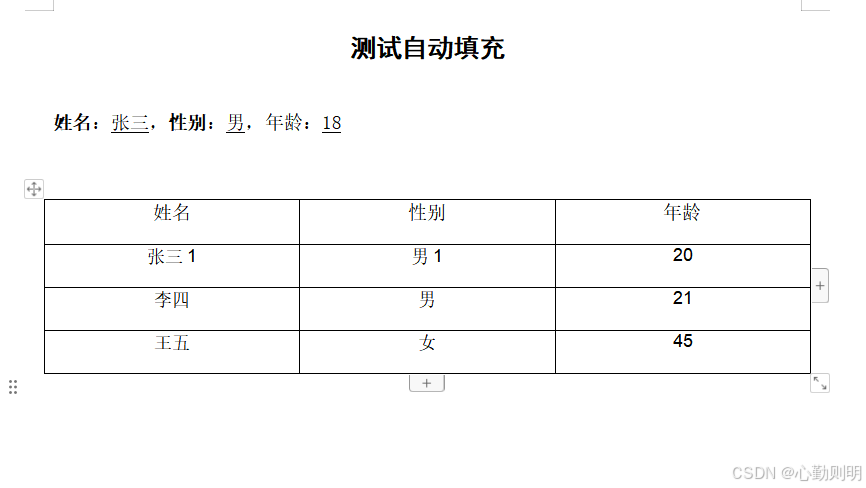
最近接到一个新的需求,用户创建好模板文件保存到模板库,然后使用在线文档编辑器打开模板时,将系统数据填充到模板文件并生成新的word文件,然后在线编辑,研究使用Apache POI和POI-OOXML实现了这个功能。
Maven依赖
<!-- Apache POI 和 POI-OOXML --><dependency><groupId>org.apache.poi</groupId><artifactId>poi</artifactId><version>5.2.2</version></dependency><dependency><groupId>org.apache.poi</groupId><artifactId>poi-ooxml</artifactId><version>5.2.2</version></dependency>自动填充的接口
import org.apache.poi.xwpf.usermodel.*;
import org.springframework.http.HttpStatus;
import org.springframework.http.ResponseEntity;
import org.springframework.web.bind.annotation.PostMapping;
import org.springframework.web.bind.annotation.RequestMapping;
import org.springframework.web.bind.annotation.RestController;import java.io.FileOutputStream;
import java.io.IOException;
import java.nio.file.Files;
import java.nio.file.Paths;
import java.util.Arrays;
import java.util.HashMap;
import java.util.List;
import java.util.Map;@RestController
@RequestMapping("/fill")
public class WordFillController {@PostMapping("/wordFill")public ResponseEntity<?> wordFill() {String templatePath = "E:\\word\\template.docx";String outputPath = "E:\\word\\output.docx";// 待填充进模板的数据Map<String, String> data = new HashMap<>();data.put("name", "张三");data.put("sex", "男");data.put("age", "18");Map<String, String> data1 = new HashMap<>();data1.put("name", "张三1");data1.put("sex", "男1");data1.put("age", "20");Map<String, String> data2 = new HashMap<>();data2.put("name", "李四");data2.put("sex", "男");data2.put("age", "21");Map<String, String> data3 = new HashMap<>();data3.put("name", "王五");data3.put("sex", "女");data3.put("age", "45");List<Map<String, String>> dataList = Arrays.asList(data1, data2, data3);try (// 从模板文件创建word文档对象XWPFDocument doc = new XWPFDocument(Files.newInputStream(Paths.get(templatePath)));// 文件输出流FileOutputStream fos = new FileOutputStream(outputPath)) {replacePlaceholders(doc, data);// 替换占位符fillTable(doc, dataList);// 填充表格// 将文档写入输出流doc.write(fos);// 刷新输出流fos.flush();return ResponseEntity.ok().build();} catch (IOException e) {e.printStackTrace();return ResponseEntity.status(HttpStatus.INTERNAL_SERVER_ERROR).body(e.getMessage());}}private void replacePlaceholders(XWPFDocument doc, Map<String, String> data) {// 遍历文档中的段落,替换占位符doc.getParagraphs().forEach(paragraph -> {// 遍历段落中的文本,替换占位符paragraph.getRuns().forEach(run -> {// 获取文本内容String text = run.getText(0);// 判断文本是否包含占位符,如果包含,则替换占位符if (text != null && text.contains("${")) {for (Map.Entry<String, String> entry : data.entrySet()) {text = text.replace("${" + entry.getKey() + "}", entry.getValue());}// 设置替换后的文本run.setText(text, 0);}});});}private void fillTable(XWPFDocument doc, List<Map<String, String>> dataList) {XWPFTable table = doc.getTables().get(0); // 获取第一个表格// 获取表格的模板行(假设表格的第一行是标题行,第二行为模板行)XWPFTableRow templateRow = table.getRow(1);// 添加新的行,并删除模板行for (Map<String, String> data : dataList) {XWPFTableRow newRow = table.createRow();// 手动创建每个单元格,并复制模板行的样式for (int i = 0; i < templateRow.getTableCells().size(); i++) {XWPFTableCell templateCell = templateRow.getCell(i);XWPFTableCell newCell = newRow.getCell(i);if (newCell == null) {newCell = newRow.createCell();}// 复制模板行单元格的样式,不复制内容copyCellStyleWithoutText(templateCell, newCell);// 填充数据switch (i) {case 0:newCell.setText(data.get("name"));break;case 1:newCell.setText(data.get("sex"));break;case 2:newCell.setText(data.get("age"));break;}}}// 删除模板行table.removeRow(1);}private void copyCellStyleWithoutText(XWPFTableCell sourceCell, XWPFTableCell targetCell) {// 复制单元格的样式,但不复制文本内容targetCell.getParagraphs().forEach(paragraph -> {XWPFParagraph sourceParagraph = sourceCell.getParagraphs().get(0);paragraph.setAlignment(sourceParagraph.getAlignment());paragraph.setVerticalAlignment(sourceParagraph.getVerticalAlignment());if (!sourceParagraph.getRuns().isEmpty()) {XWPFRun sourceRun = sourceParagraph.getRuns().get(0);XWPFRun targetRun = paragraph.createRun();targetRun.setBold(sourceRun.isBold());targetRun.setItalic(sourceRun.isItalic());targetRun.setFontFamily(sourceRun.getFontFamily());targetRun.setFontSize(sourceRun.getFontSize());}});// 复制单元格背景色等样式targetCell.setColor(sourceCell.getColor());targetCell.setVerticalAlignment(sourceCell.getVerticalAlignment());}
}
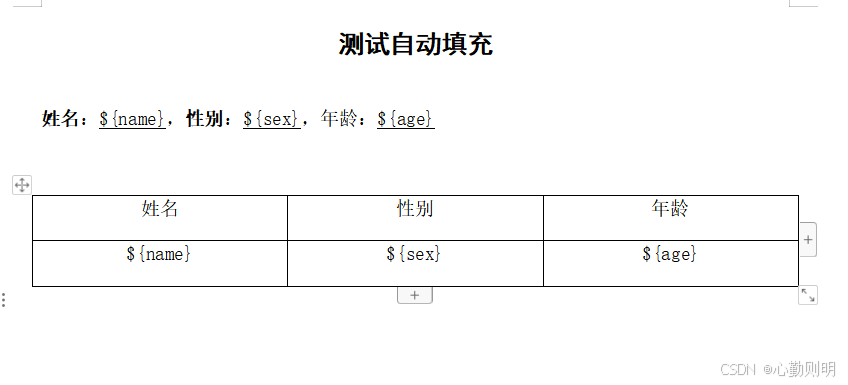
word模板
调用接口后生成的新文件